Easy Battery Monitoring
Dibar BMS Suite

Simple, reliable tools for your LiFePO4 batteries with JBD Smart BMS. Check your battery in any browser without installing anything, keep live battery % right next to your clock in Windows, monitor on Android, or set up a dedicated color screen on your desk.

100% Private (No Cloud & No Internet Needed)
Supports 2 Batteries Together
Monitors Every Cell Individually
Fast Bluetooth Connection
How Dibar BMS Suite Works
Toggle between charge and discharge to see real-time power flow:
BATTERY #1 4S LiFePO4 +10.0A (98%) BATTERY #2 4S LiFePO4 +9.98A (97%) ⚡ DIBAR BMS 266 W 13.3 V • +20.0 A Current delta: 0.02 A 4 cells balanced 🌐 Web App 🪟 Windows App 📱 Android App 📺 Dibar BMS Display

Products in Dibar BMS Suite

About the Suite

What is Dibar BMS Suite?

Dibar BMS Suite is a collection of simple, reliable tools created for LiFePO4 battery systems using JBD Smart BMS. It gives you complete peace of mind: you always see exact battery percentage, remaining runtime, and the health of each cell. Pick the tool that fits your routine best — a browser tab, a Windows desktop app, an Android app, or a standalone display.

Supported BMS Boards
JBD (Jiabaida, Xiaoxiang) via Bluetooth
Battery Types
LiFePO4 & Li-ion (12V, 24V, 48V, from 3S to 24S)
Privacy & Security
100% Local: no cloud, no tracking, no accounts
Dual Battery Support
Calculates total power and checks current balance
01 • Web Application

Instant Battery Monitor in Your Browser

Runs right in your browser at dibms.de on any PC, tablet, or phone via Bluetooth. No drivers, no downloads, and no registration required — simply open and connect.

  • ✓
    Two Batteries Together: automatically adds up battery percentage, total current, and real-time wattage for dual battery banks.
  • ✓
    Individual Cell Voltages: shows exact voltages for every cell and highlights which cells are balancing right now.
  • ✓
    Remaining Runtime (ETA): gives you a clear forecast in hours and minutes until full discharge or full charge.
  • ✓
    Fullscreen Kiosk Mode: large, high-contrast numbers easily readable from across the room (e.g. wall tablet).
Supported Browsers Chrome, Edge, Opera, Bluefy (on iPhone)
Connection Bluetooth (wireless, no drivers)
Privacy 100% on your device
Data Refresh Every few seconds

Dibar BMS Web App Interface Preview
🔋 Cell Balancing Status (8S LiFePO4)
Balancing Active
C1 3.328V C2 [BAL] 3.332V C3 3.329V C4 3.330V C5 [BAL] 3.332V C6 3.328V C7 3.330V C8 3.329V
02 • Windows Desktop App

Battery Percentage on Your Windows Taskbar

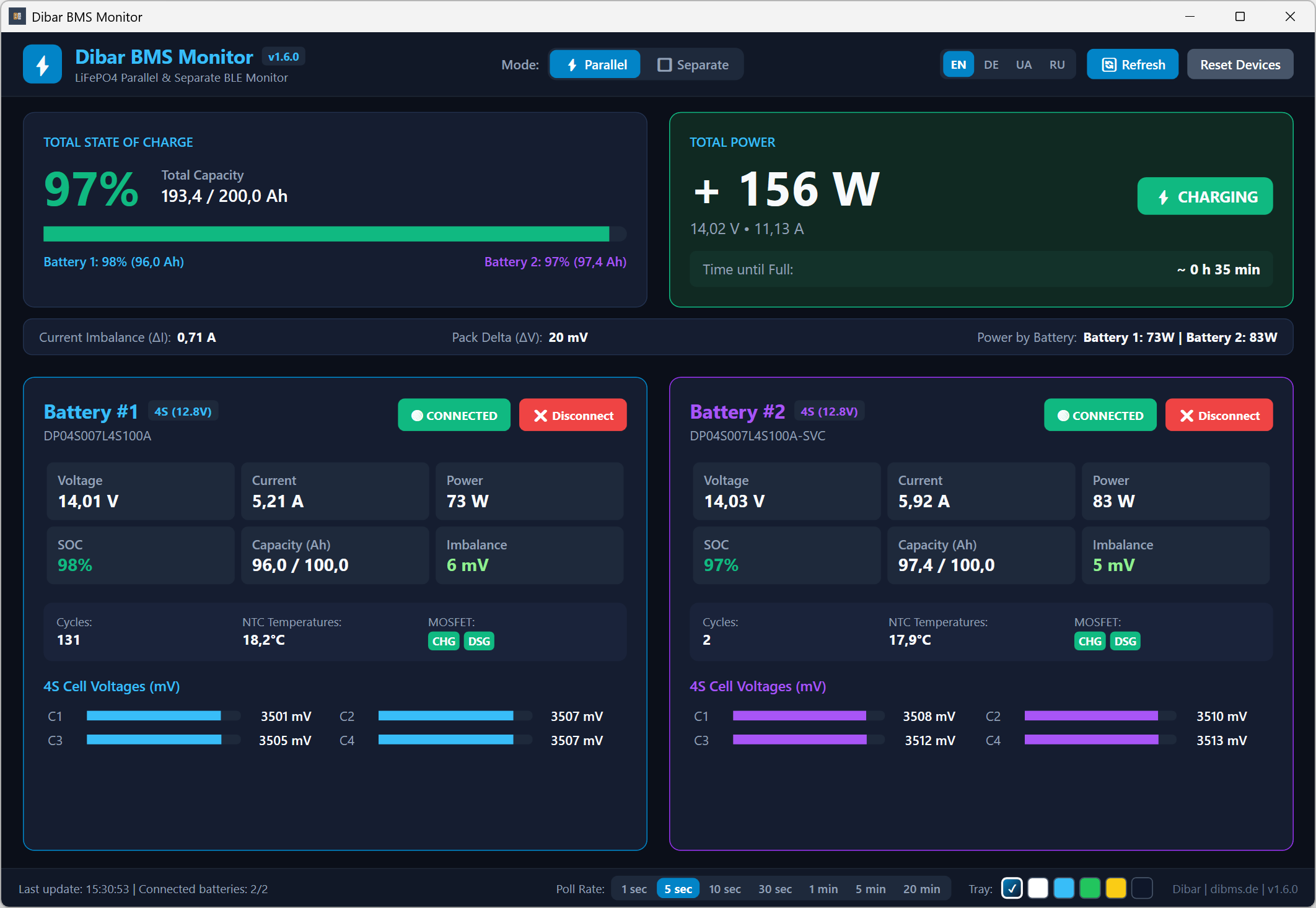
Convenient application for your Windows 10 or 11 computer. Runs quietly in the background, keeping your live battery % visible next to the clock.

  • ✓
    Live Tray Battery %: your battery percentage (e.g. '98%') stays visible next to the clock without opening windows.
  • ✓
    Parallel and Separate Modes: toggle between combined dual-battery monitoring and independent readouts for each separate battery pack.
  • ✓
    Automatic Reconnection: the app remembers your battery devices and connects automatically on next startup.
  • ✓
    Dual Battery Support: shows total combined power in watts and ensures both packs discharge evenly.
Operating System Windows 10 & 11 (x64 & ARM64)
Installation From Microsoft Store
PC Resource Usage Negligible (runs quietly in background)
Connection Bluetooth + local Wi-Fi (with Dibar Display)
WINDOWS TASKBAR TRAY ICON
⚡ 98%
🔊 📶 14:28
Dibar BMS Windows Desktop App - Parallel Charging
03 • Android App

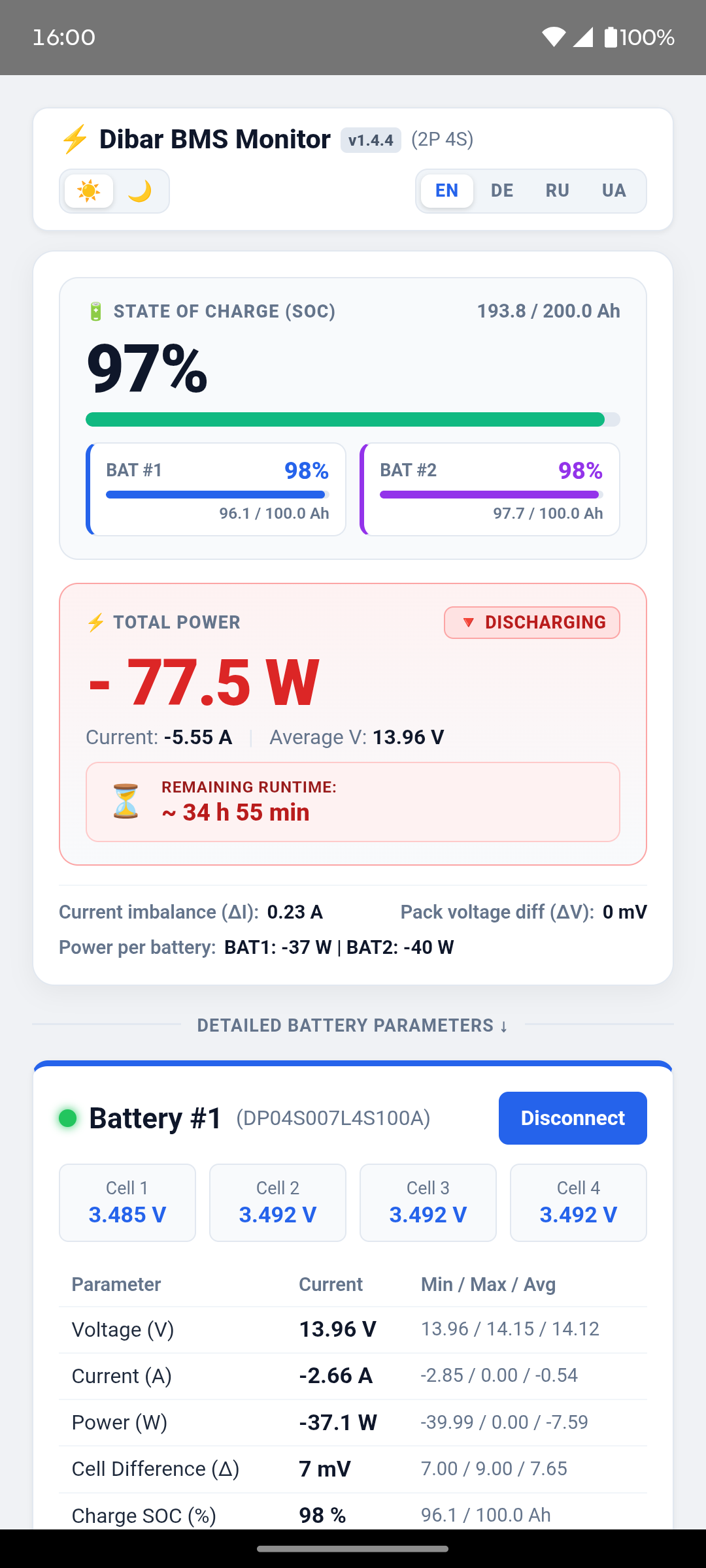
Mobile Companion in Your Pocket

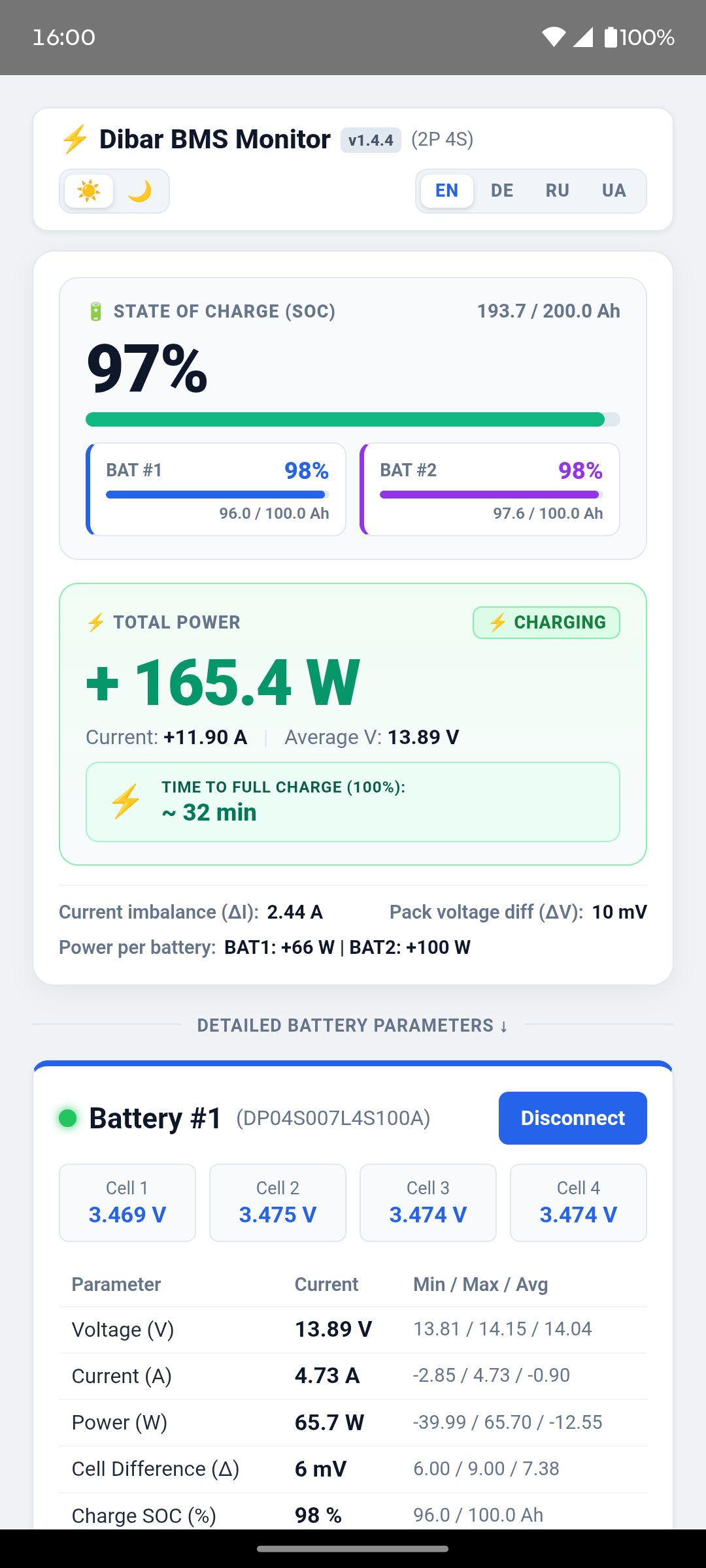
Keep an eye on your battery bank right from your smartphone. Convenient mobile monitoring and instant per-cell diagnostics on one screen.

  • ✓
    Handy Mobile Monitoring: view overall SOC %, power in watts, current, and individual cell voltages directly on your phone or tablet.
  • ✓
    Parallel & Separate Modes: supports both combined metrics for parallel batteries and split-screen viewing for independent packs.
  • ✓
    Fullscreen Kiosk Mode: special large-digit display layouts ideal for wall-mounted tablets or dedicated display phones.
  • ✓
    Light & Dark Themes: automatically matches your phone's appearance for great visibility day and night.
System Requirements Android 7.0 or newer
Installation Coming soon to Google Play
Wireless Connection Bluetooth Low Energy (BLE)
Display Modes Standard and Fullscreen Kiosk
Coming soon to Google Play
Android App Dashboard View
Android App Cell Balancer View

🔍 Click any screenshot for high-resolution preview

04 • Dibar BMS Display

Dedicated Device with a Color Screen

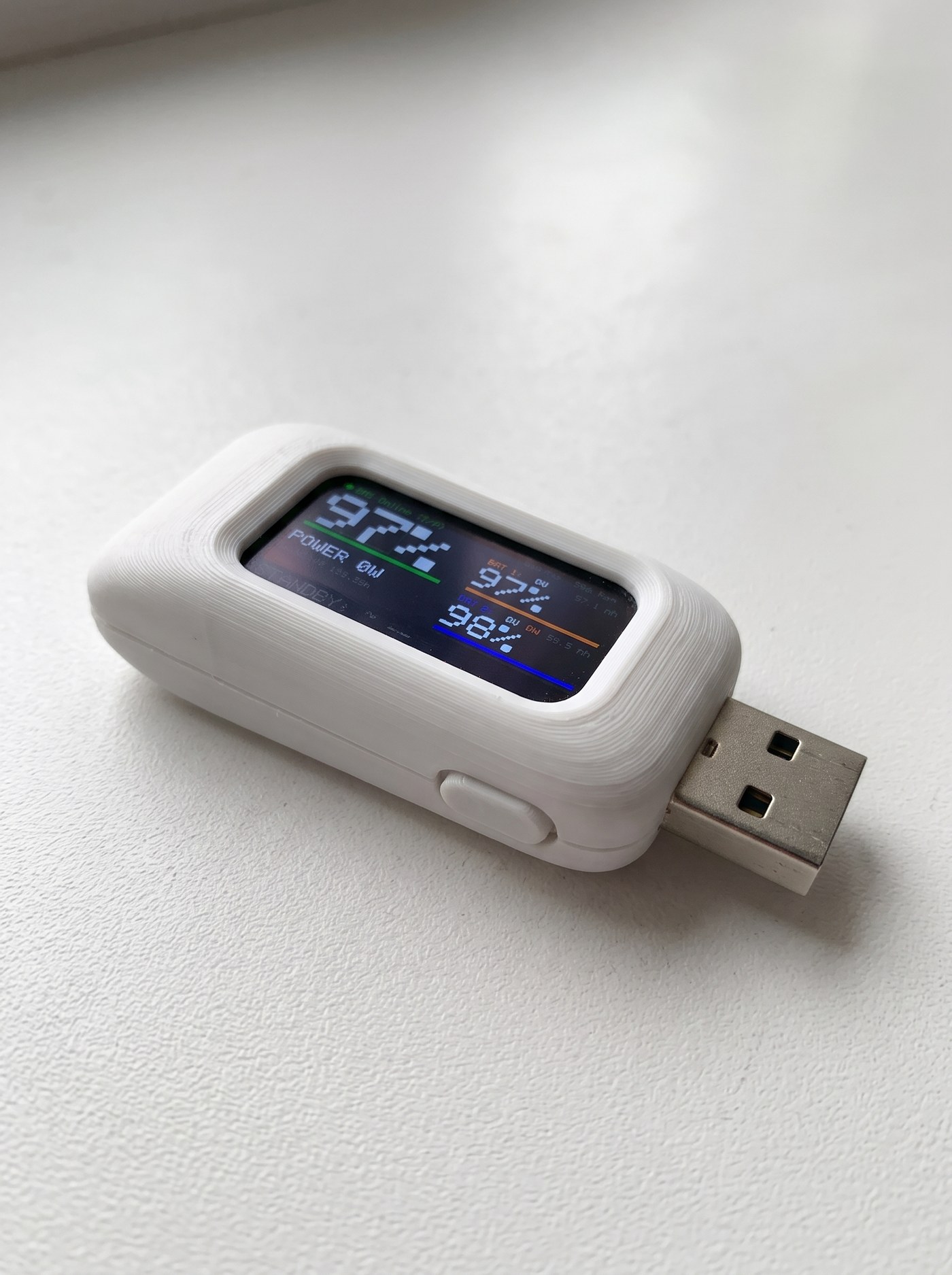
A compact standalone monitor with its own bright color screen. Place it on your desk or next to your battery bank — it works 24/7 without needing a phone or PC.

  • ✓
    Dual Battery Connection: connects to two batteries via Bluetooth simultaneously and calculates total metrics on the fly.
  • ✓
    Color Screen & Wi-Fi Access: displays telemetry on its built-in color screen and provides a simple web page you can open over local Wi-Fi.
  • ✓
    MicroSD History Logging: regularly logs operating history to a memory card for checking real capacity and battery health.
  • ✓
    BLE Broadcast Telemetry: broadcasts live battery data to multiple Android and Windows devices simultaneously without occupying the BMS Bluetooth channel.
  • ✓
    Minimal Power Draw: plugs into any standard USB-A port or charger, draws under 0.8W, and runs reliably 24/7/365.
Power Supply Standard USB-A plug (under 0.8W)
Display Bright color screen
Wireless Bluetooth + home Wi-Fi
Storage MicroSD card slot
📋 Release Notes
Dibar BMS Display Real Hardware Device
Standalone device with screen

Dibar BMS Display hardware unit: compact enclosure, color screen, powered via standard USB-A plug.

Comparison of Dibar BMS Suite Options

Choose the tool or combination that fits your setup best

Feature / Capability Web App (dibms.de) Windows Desktop Android App Dibar BMS Display
Where it runs Browser (PC, tablet, or phone) Computer (Windows 10 / 11) Android smartphone or tablet Dedicated device on your desk
Installation required? ✓ No (opens instantly) Yes (from Microsoft Store) Coming soon to Google Play ✓ No (ready-to-use device)
Two batteries simultaneously ✓ Yes (total & balance) ✓ Yes (total & balance) ✓ Yes (total & balance) ✓ Yes (total & balance)
Screen display / taskbar tray — ✓ Tray icon next to clock ✓ Mobile interface ✓ Dedicated color screen
Dedicated physical screen — — — ✓ Color display
Battery history logging — ✓ Charts & CSV from MicroSD — ✓ Regularly to MicroSD card
Internet dependency 0% (Works completely offline) 0% (Works completely offline) 0% (Works completely offline) 0% (Works completely offline)
Runs without a phone or PC Browser required PC must stay on Smartphone required ✓ 100% Standalone (< 0.8W)
Frequently Asked Questions

Frequently Asked Questions about Dibar BMS Suite

Clear answers to the most common questions about setup and daily use

Which batteries and BMS models are supported? +

It supports LiFePO4 and Li-ion batteries managed by JBD (Jiabaida / Xiaoxiang Smart BMS) controllers of any voltage (12V, 24V, 48V, from 3 to 24 cells). It connects via built-in Bluetooth.

Do I need internet access or an account? +

No, internet is not needed. All applications work 100% locally on your devices. No battery data is ever uploaded anywhere, and no registration or subscription is required.

How does monitoring two batteries at the same time work? +

When you have two battery packs connected together, the app links to both BMS units concurrently. It combines their current, displays overall capacity and wattage, and lets you verify that both batteries share the load evenly.

What do I need to open the Web App in my browser? +

Any modern browser supporting Bluetooth on a PC or Android (such as Google Chrome, Microsoft Edge, or Opera). Just visit dibms.de, click connect, and you are ready. On iPhone, use the free Bluefy browser.

Why choose the standalone Dibar BMS Display? +

Dibar BMS Display is an autonomous plug-and-play monitor with a color display that runs 24/7 without a PC or phone. It plugs into any USB-A port or charger, consumes under 0.8W, and logs history regularly to an onboard memory card.

Can I monitor two batteries separately if they are not connected in parallel? +

Yes. All apps support Separate Mode: you get independent cards for each battery showing individual SOC %, voltage, and current without mixing them together.

💡

Helpful Tip: Why should you keep an eye on individual cells and dual battery balance?

In LiFePO4 batteries, overall voltage remains almost completely flat for most of the discharge cycle, making standard voltmeters unreliable for gauging capacity. Dibar BMS reads every cell individually, allowing you to catch a weaker cell early before your inverter shuts down unexpectedly. When running two batteries together, the app checks that load current is shared evenly.